
Username Combiner
Username Combiner – Free Unique Username Generator
Every good username you can think of is already taken. That’s not paranoia, it’s just how it goes after two decades of the internet — the short, obvious ones went years ago. A username combiner solves this the way people actually solve it in real life: instead of typing one word and hoping, you blend two (or more) words together and get something original enough that it’s still free almost anywhere you sign up.
Type in two words a name, a hobby, an adjective, anything — pick a style, and the tool generates real combined usernames, not just the two words stuck together with a number after them. You’ll get partial blends, prefix and suffix variations, and full mixes depending on the style you choose, so you’re picking from options that actually sound like a username rather than a keyword mash.
How the Username Combiner Works
- Enter Word 1 and Word 2 — these are required. Add a third or fourth word if you want more to blend from.
- Choose a style: Blend, Gamer, Aesthetic, Pro, or Short.
- Click generate and browse the results. Tap any username to copy it straight to your clipboard.
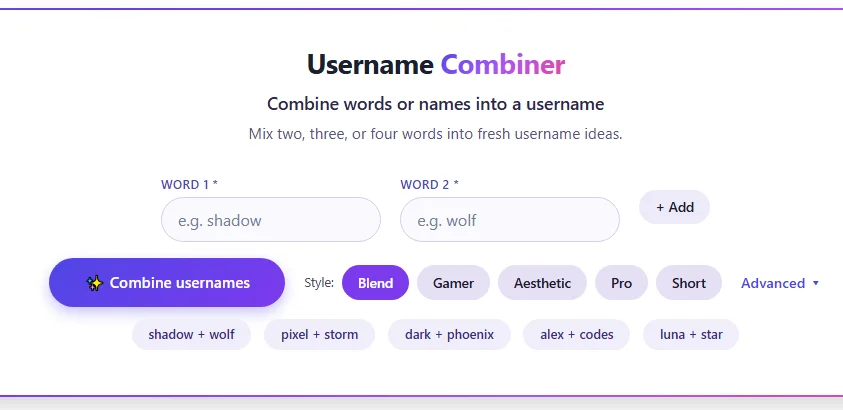
Open the Advanced panel if you want more control. You can add numbers automatically (useful when the plain version of a name is already taken), choose a separator like an underscore or dot, force capitalization, and set a minimum and maximum length so the results fit whatever character limit the platform you’re signing up for actually enforces. Everything runs in your browser, so there’s no waiting and nothing you type is saved anywhere.
Blend Style: The Classic Combination
This is the core of the tool. Instead of gluing your two words together at the middle, it takes different-length slices of each word and cross-blends them, so “shadow” and “wolf” doesn’t just give you “shadowwolf” — it gives you “shadolf,” “shalf,” “shadwolf,” and dozens of other real-sounding variations. It’s the fastest way to get a genuinely original username from two ordinary words.
Gamer Username Generator
If you’re setting up a tag for a game, a Discord server, or a streaming handle, the Gamer style adds the prefixes and suffixes you’ll recognize from actual gaming platforms — “shadow,” “toxic,” “rapid,” and “ghost” on one end, “yt,” “gg,” “op,” and “zz” on the other — plus the “xX…Xx” wrap format. Turn on numbers in the advanced panel if your first pick still comes back taken; a short number at the end usually gets you an available handle without changing the name you actually wanted.
Aesthetic Username Ideas
Built for Instagram, Pinterest, and anywhere the vibe matters as much as the name itself. This style leans on soft, dreamy words like “moon,” “velvet,” “cloud,” and “petal” combined with your input, giving you usernames that read more like a mood than a random string of letters.
Professional Username Generator
For a portfolio, a freelance handle, or a small business account, the Pro style keeps things clean — “the,” “real,” or “official” in front, “co,” “hq,” “studio,” or “labs” on the end. These read as intentional rather than playful, which matters if the account is meant to look established.
Short Username Ideas
Some platforms cap usernames at 15 characters or less, and sometimes you just want something quick to type. The Short style skips the decoration entirely and gives you trimmed versions and initials — including combined initials when you enter more than one word — so you get options that are fast to type and still recognizably yours.
Tips for Choosing a Username That Lasts
- Check it across platforms before you commit. A username being free on one site doesn’t mean it’s free everywhere; run your favorite through a couple of the platforms you actually use before settling on it.
- Keep numbers meaningful if you can. A random number tacked on works, but a birth year or a number that means something to you is easier to remember later.
- Match the style to the platform. A Gamer-style tag looks out of place on a professional network, and a Pro-style handle looks stiff on a gaming server the same input can generate very different results depending on where it’s headed.
- Avoid usernames that are hard to say out loud. If you’ll ever need to tell someone your username verbally, test that before you lock it in.
Frequently Asked Questions
Is the username combiner free to use?
Yes. There’s no sign-up and no limit on how many times you can generate combinations.
Can I combine more than two words?
Yes. Use the “Add” button to include a third or fourth word, and the tool will blend all of them together, not just the first two.
Does this check if a username is actually available?
No. The tool generates original combinations based on the words you enter, but it doesn’t check live availability on any platform. Because the results are genuinely blended rather than dictionary words, they tend to be free more often than plain names, but it’s still worth checking the platform directly before you commit.
Which style should I use for gaming platforms?
Gamer is built for that it adds the prefixes, suffixes, and wrap formatting common on gaming and streaming platforms. Turn on the number option if your first choice is taken.
Can I control how long the username is?
Yes. Open the Advanced panel and set the minimum and maximum length to match whatever limit the platform you’re using requires.